Contents
Teams are built around skills, experience, and availability. Behavioral composition is rarely considered. When a team underperforms, the diagnosis usually focuses on individual capability or process failures, not on the behavioral dynamics between team members.
But a team of high-performing individuals can still produce poor results if their collective behavioral drives create blind spots, friction, or gaps that nobody has identified. A team stacked with dominant, fast-moving personalities may push hard for results but miss critical details. A team of cautious, process-oriented people may produce thorough work but struggle to make decisions under time pressure. A team where everyone shares the same communication style may feel harmonious but fail to challenge ideas. These patterns are predictable, but only if you have the data.
PI Design is the team optimization module of the Predictive Index talent optimization platform. It maps the behavioral composition of any team, identifies the team's collective strengths and blind spots, and shows how the team's dynamics align (or misalign) with its strategic objectives. This article explains what the module does, how each feature works, and what it takes to implement it.
In Brief
PI Design is the team optimization module within the Predictive Index Talent Optimization Platform. It aggregates individual behavioral assessment data into a team-level view, identifying how the group's collective drives create strengths and potential gaps. The platform maps each team member on a four-quadrant Team Map, assigns one of nine Team Types based on the team's aggregate behavioral pattern, aligns the team against its strategic objectives, and generates an Action Planner with specific steps to address caution areas. PI Design is used by HR professionals, senior leaders, and managers. Training requirement: Decode Workplace Behaviour (full day, mandatory) followed by Build High-Performing Teams with PI Design (half day, mandatory).
Key Takeaways
- PI Design is the team optimization module of the Predictive Index Talent Optimization Platform.
- It maps a team's behavioral composition and identifies collective strengths and blind spots using a four-quadrant Team Map.
- The platform assigns one of nine Team Types (Exploring, Bolstering, Cultivating, Anchoring, Stabilizing, Executing, Producing, Pathfinding, Adapting) based on the team's aggregate behavioral pattern.
- Strategy + Objectives alignment shows where the team's behavioral composition supports or conflicts with its strategic goals, with its own Strategy Type, strengths, and caution areas.
- The Action Planner generates specific, assignable action items derived from the team's caution areas.
- Team Type and Strategy Type do not need to match; the platform provides specific benefits and friction points for each combination.
- The minimum team size is three people.
- Training: Decode Workplace Behaviour (full day, mandatory) then Build High-Performing Teams with PI Design (half day, mandatory).
- Pricing is headcount-based with unlimited usage on one, two, or three year subscriptions.
What is the Predictive Index and where does PI Design fit?
The Predictive Index was founded in 1955 and has developed into a talent optimization platform built around four modules: PI Hire (hiring), PI Inspire (management and leadership), PI Design (team optimization), and PI Diagnose (employee engagement). PI Design is the module that shifts the lens from the individual to the team.
The foundation of all four modules is the PI Behavioral Assessment™, a validated psychometric instrument that measures four primary behavioral drives: Dominance, Extraversion, Patience, and Formality. The assessment received EFPA certification in 2018, with recertification in 2021. It is available in more than 70 languages and used by over 10,000 organizations globally.
Where PI Hire and PI Inspire apply behavioral data to individuals, PI Design applies the same data to the collective. It takes each team member's behavioral assessment results and aggregates them into a team-level view that reveals how the group is wired, where it will naturally excel, and where it will struggle.
Progressica is a certified Predictive Index partner, serving organizations across Malta, Latvia, Lithuania, Estonia, Portugal, Italy, Cyprus, UAE, Saudi Arabia, and Singapore. We have been a certified PI partner since 2016.
What is PI Design?
PI Design takes individual behavioral assessment data and aggregates it at the team level. It does not assess team performance. It maps behavioral composition and predicts where the team will naturally excel and where it will need deliberate effort.
The module is built around a stepped workflow with four main sections:
- Team Members — the team roster, showing each person's Reference Profile and behavioral pattern
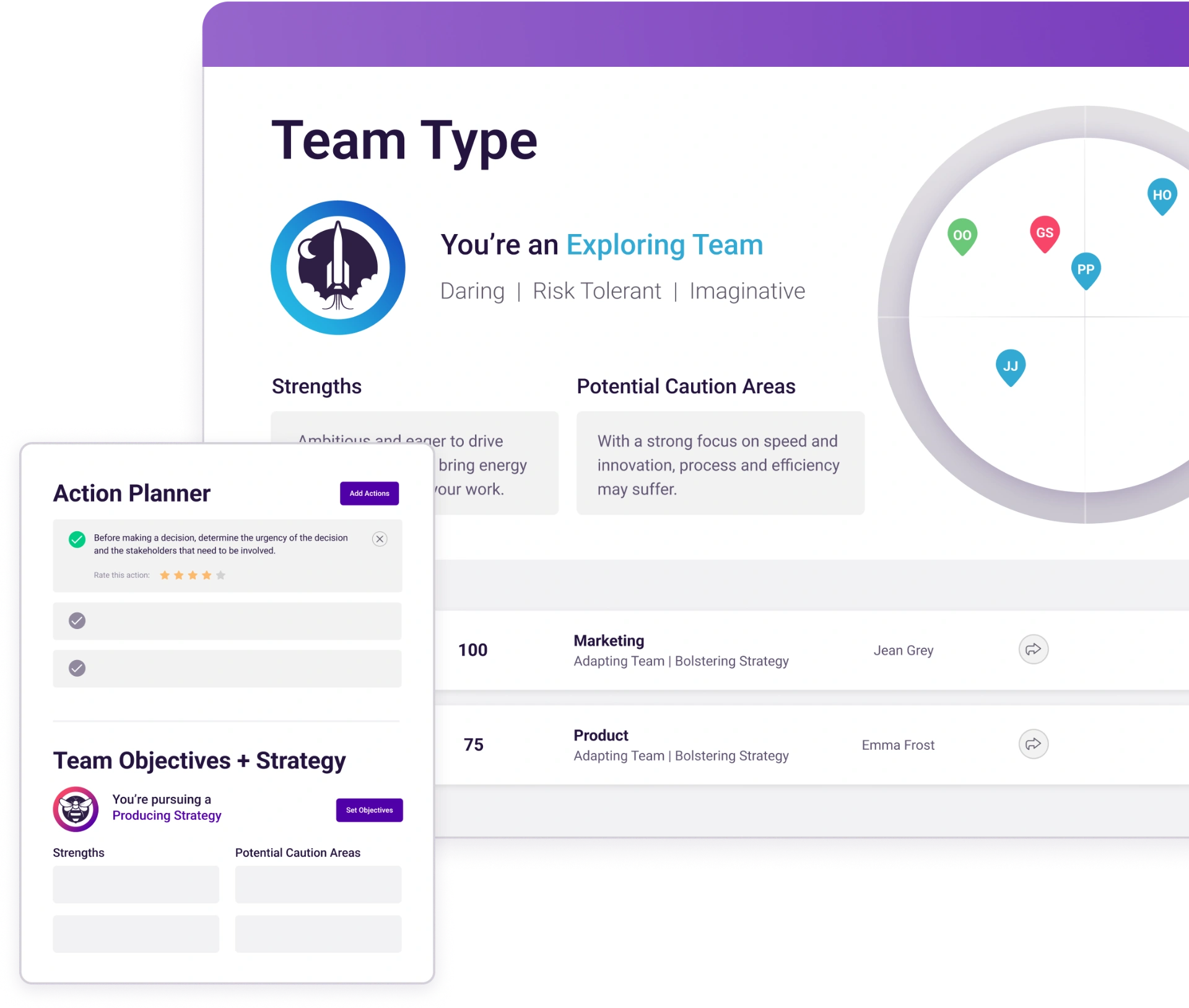
- Team Type — the team's collective behavioral identity, with strengths and potential caution areas
- Action Planner — specific, assignable action items derived from the team's caution areas
- Strategy + Objectives — an advanced section that maps the team's behavioral composition against its strategic goals
On the left side of the interface, a persistent Team Map plots every team member on a four-quadrant circular chart, giving an immediate visual read of how the team's behavioral drives are distributed. A Team Activity Score (0 to 100) tracks how much the team has engaged with PI Design's features.
Three audiences use PI Design:
HR professionals use it for team restructuring, post-merger integration, and workforce planning. They create teams in the platform, analyze composition, and use the findings to inform hiring and organizational design decisions.
Senior leaders use it to review whether their team's behavioral composition supports the team's strategic priorities. When a team is struggling, PI Design provides a behavioral lens that complements operational and financial diagnostics.
Managers use it to understand why their team operates the way it does. The Team Type and caution areas often name dynamics the manager has felt but could not articulate.
The minimum team size is three people. The platform notes that the average team size is seven.
The Team Map: a visual read of your team
The Team Map is the visual centerpiece of PI Design. It is a circular chart divided into four quadrants, each representing a strategic orientation.
- Innovation & Agility (top-right)
- Teamwork & Employee Experience (top-left)
- Process & Precision (bottom-left)
- Results & Discipline (bottom-right)
Each team member is plotted on the map as a dot with their initials, positioned according to how their individual behavioral drives relate to the four quadrants. The map persists on the left side of the interface throughout all steps, so you always have a visual reference for the team's composition while reviewing Team Type, Action Planner, and Strategy data.
How to read the Team Map. Where dots cluster indicates the team's collective behavioral center of gravity. A team with most members clustered in Innovation & Agility will naturally gravitate toward new ideas, experimentation, and fast-paced work. A team clustered in Process & Precision will naturally gravitate toward thoroughness, structure, and quality control.
Gaps matter as much as clusters. If no team members sit in the Results & Discipline quadrant, the team may struggle with execution focus and holding people accountable. If no one sits in Teamwork & Employee Experience, the team may move fast but miss the interpersonal dynamics that affect morale and retention. These gaps are not character flaws. They are structural features of the team's behavioral composition.
Outliers are informative. A team member whose dot sits far from the cluster brings something the rest of the team lacks. That is valuable, but it also means that person may experience friction, feel unheard, or struggle to influence the group. The Team Map makes this dynamic visible before it becomes a problem.
Purple arc lines around the outer ring of the map represent the team's collective behavioral range, showing where the team's emphasis falls across the four quadrants.
Team Members: understanding who is on the team
Step 1 in the PI Design workflow is the Team Members panel. It lists every person on the team with their name, Reference Profile (such as Maverick, Captain, or Artisan), a small inline behavioral pattern graph, and their pin color on the Team Map.
An "Edit team members" button lets you add or remove people. When team composition changes, the Team Type, Action Planner, and Strategy alignment all recalculate automatically. This means you can model the impact of a hire, a departure, or a reorganization before it happens.
The Team Members panel is also the starting point for understanding behavioral diversity within the team. A team with five members who share the same Reference Profile will have a very different dynamic from a team with five distinct Reference Profiles. The panel makes this visible at a glance.
Each team member's Reference Profile is a shorthand for their behavioral drive pattern, but as with individual PI data, the drives themselves are always more informative than the profile name. Two people labeled "Captain" may differ meaningfully in drive intensity.
Team Type: the team's collective behavioral identity
Step 2 identifies the team's Team Type, which is derived from the team's aggregate behavioral pattern. PI Design defines nine Team Types:
- Exploring — Daring, Risk Tolerant, Imaginative
- Bolstering — supportive, relationship-focused, collaborative
- Cultivating — patient, deliberate, people-oriented
- Anchoring — stable, process-driven, methodical
- Stabilizing — consistent, detail-oriented, structured
- Executing — results-focused, disciplined, efficient
- Producing — driven, competitive, output-oriented
- Pathfinding — visionary, independent, strategic
- Adapting — flexible, versatile, responsive
Each Team Type comes with a description of how the team works, a set of Strengths (four cards describing what the team does well), and a set of Potential Caution Areas (four cards describing where the team may struggle).
For example, an Exploring Team is described as outgoing, cooperative, and eager to work together, with an active desire to learn and try new things. Innovation is the goal. People stand by their views but are willing to listen to others. This allows for constructive conflict, which helps pressure-test or produce new ideas.
The Strengths for an Exploring Team include being ambitious and eager to drive things forward, being quick to make new connections and expand networks, and consistently asking "What's next?" The Potential Caution Areas include a tendency for process and efficiency to suffer, a risk of being too focused on the big picture and not enough on implementation details, and a tendency to abandon ideas quickly if they do not work the first time.
The platform also provides a benchmark stat: "18% of teams are Exploring Teams." This gives the team a sense of how common their type is.
A feedback prompt ("Does this sound like your team?" with "Spot on" and "No way" options) lets team members validate or challenge the classification. This is a useful facilitation tool. When a team discusses whether their Team Type description is accurate, the conversation itself builds the self-awareness that PI Design is designed to create.
The Team Type is descriptive, not prescriptive. It tells you what the team naturally does well and where it will need deliberate effort. It does not tell you the team is "good" or "bad." Every Team Type has strengths and every Team Type has caution areas.
Action Planner: turning insight into specific steps
Step 3 is the Action Planner, which translates the team's Potential Caution Areas into specific, assignable action items.
Each action item includes:
- A clear description of the action (for example, "Create a project timeline process that allocates time for review and/or quality assurance")
- An assignee field (defaults to Unassigned, can be assigned to a specific team member)
- A due date field
- A star rating to evaluate the action's usefulness after implementation
The Action Planner items are not generic team-building activities. They are generated based on the team's specific Team Type and caution areas. An Exploring Team that tends to move fast and skip process gets action items about building in review time and creating iteration timelines. A Stabilizing Team that tends toward rigidity would get different action items about flexibility and experimentation.
The "Open Action Planner" button opens the full planner view, and "Highlighted actions" shows the most relevant items on the main dashboard.
The Action Planner is what moves PI Design from an insight tool to an operational tool. Without it, the Team Type and caution areas are interesting but passive. The Action Planner makes them actionable by giving the team specific tasks to work on, with ownership and deadlines.
In practice, the most productive way to use the Action Planner is during a team meeting or offsite. The team reviews the highlighted actions, discusses which ones are most relevant, assigns owners, and sets timelines. This conversation, anchored in behavioral data rather than subjective opinions, is often more productive than typical team retrospectives.
Strategy + Objectives: mapping the team against its goals
The Strategy + Objectives section is labeled "Advanced" in the platform and is the most strategically important feature in PI Design. It answers the question: is this team behaviorally equipped to achieve its strategic goals?
The platform defines 10 Strategy Types that pair with the nine Team Types. Each Strategy Type represents a different strategic orientation. For example, an Exploring Strategy seeks to create unique products and services, keeping company goals flexible and steering clear of narrowly defined objectives. Organizations pursuing this strategy experiment with a wide variety of new ideas and initiatives, ensure processes are adaptable and decentralized, and aim to quickly enter new markets.
Team Type and Strategy Type do not need to match. This is a critical point. A team's behavioral composition (Team Type) and its strategic mandate (Strategy Type) are two different things. An Exploring Team might be pursuing a Stabilizing Strategy. The platform explicitly addresses this: instead of worrying about matching the types, you should focus on what strengths and gaps your team has relative to its goals.
When the Team Type and Strategy Type differ, the platform provides specific benefits and friction points for that combination. For example, an Exploring Team pursuing a Stabilizing Strategy benefits from its fast pace ensuring processes are efficient, and from its ability to find innovative ways to achieve process and precision. The friction points include difficulty sticking to defined processes and a risk of getting stuck perfecting an idea rather than moving to the next one.
A "Set New Objectives" button lets you change the team's strategic objectives, which recalculates the alignment analysis. This makes it possible to model different strategic scenarios and see how the team's behavioral composition supports or conflicts with each one.
The Strategy + Objectives section also includes its own Strengths and Potential Caution Areas cards, separate from the Team Type cards. These are specific to the team-strategy combination, not the Team Type alone. The platform provides a benchmark stat for this too: "12% of Exploring Teams pursue this strategy."
The practical value of this section is in strategic planning conversations. When a leadership team sets new priorities, PI Design can show whether the existing team composition supports those priorities or whether adjustments (hiring, reorganization, deliberate behavioral strategies) are needed.
The Team Activity Score: tracking engagement with PI Design
The Team Activity Score is a number from 0 to 100 that appears next to the team name. It is not a measure of team performance or behavioral fit. It is a usage and engagement metric that tracks how much the team has engaged with PI Design's features.
The score increases organically as you use the platform: creating the team and adding members, revealing the Team Type, revealing the Strategy Type, using the Action Planner, and sharing team insights with others in the organization.
A higher Team Activity Score indicates a higher degree of awareness within the team. This awareness covers behavioral traits of individual team members, the team's collective behavioral makeup, preferred communication and work styles, team strengths and caution areas, and strategic goals and objectives.
The score is useful as a quick gauge of whether the team is actually using PI Design or whether it has been set up and forgotten. You can compare Team Activity Scores across teams in your organization to see which teams are actively engaging with the data and which need encouragement.
Using PI Design for team formation and hiring
When building a new team, PI Design lets you model what the team's behavioral composition will look like before making final decisions. You can add prospective members to a team in the platform and see how their drives affect the Team Map, Team Type, and strategic alignment.
When hiring into an existing team, PI Design shows what the team currently lacks. If the Team Map has a gap in Process & Precision and the team's caution areas include thoroughness and follow-through, the next hire should bring behavioral drives that fill that gap.
This connects directly to PI Hire. PI Design diagnoses what the team needs behaviorally. PI Hire supports the selection process, including creating a Job Target that reflects the behavioral profile PI Design has identified as missing. The two modules share the same behavioral data foundation.
The full cross-module cycle: PI Design identifies the team's behavioral gaps. PI Hire selects the right person to fill those gaps. PI Inspire helps manage and develop that person once they are on the team. PI Diagnose measures how engaged the team is over time.
Using PI Design for team diagnosis
When a team is underperforming, the conversation usually centers on individual capability, workload, or process. PI Design adds a behavioral lens that is often missing from that conversation.
Three common patterns emerge when using PI Design for diagnosis:
Behavioral homogeneity. Everyone on the team shares similar drives. This feels comfortable because communication is easy and conflict is low. But it means the team has collective blind spots. A team of high-Dominance, low-Patience individuals will move fast and push for results but may consistently miss details, skip quality checks, and resist structured processes. No one on the team naturally fills the gap because no one on the team has the drives to notice it.
Behavioral friction. The team has diverse drives, but the diversity is creating unproductive tension rather than productive debate. A person with high Formality who needs structure and clarity will feel frustrated on a team where everyone else operates informally and makes decisions on the fly. The friction is not a personality clash. It is a behavioral mismatch that the Team Map makes visible.
Missing behavioral range. The team covers three of the four quadrants well but has no one in the fourth. The team does not notice what it is missing because no one is wired to notice it. PI Design identifies these gaps structurally.
PI Design does not diagnose skill gaps, resource constraints, or leadership failures. It diagnoses behavioral composition. When combined with PI Diagnose (which measures employee experience and engagement), the two modules provide a comprehensive picture: PI Design shows how the team is wired, and PI Diagnose shows how the team feels about its work.
Who uses PI Design and when
HR professionals
Team restructuring, post-merger integration, and workforce planning. Model behavioral composition before headcount is finalized.
Senior leaders
Review whether the leadership team's composition supports the organization's strategic priorities — and adjust when strategy shifts.
Managers
Understand why the team operates the way it does. The Team Map and caution areas name dynamics managers have felt but couldn't articulate.
PI Design is most useful during five moments:
- Team formation — before a new team is finalized
- Reorganization — when teams are being restructured or merged
- Persistent performance issues — when operational and skill-based explanations have been exhausted
- Strategic pivots — when a team's mandate changes and new behavioral capabilities may be needed
- Post-departure — when a key team member leaves and the team needs to understand what behavioral capacity it has lost
What training is required
PI Design requires two mandatory training sessions. No exceptions.
Decode Workplace Behaviour (full day, mandatory for all PI modules)
Decode is the foundational training for everything in the Predictive Index platform. It covers what the PI Behavioral Assessment™ measures, the four behavioral drives, the distinction between Self, Self-Concept, and Synthesis, and the responsible use of behavioral data. Every person who will use any PI module must complete Decode first. This is a full-day session.
Build High-Performing Teams with PI Design (half day, mandatory for PI Design users)
This is the PI Design-specific training. It covers Team Types, Strategy Types, the Action Planner, and practical application of team-level behavioral data. It can be delivered in person or virtually. It is always scheduled after Decode, never before.
Who must be trained (minimum): The Key Contact, meaning the person responsible for administering the platform within the organization.
Who should be trained (strongly recommended): HR professionals who will use PI Design for team planning and restructuring. Senior leaders who will interpret team data and make decisions based on it. Managers who want to use PI Design to understand and improve their own teams.
The training timing gap. In practice, platform access begins before training is complete. Progressica bridges this gap with an onboarding session that provides enough orientation for initial use while the formal training schedule is confirmed.
Modular expansion. As organizations add other PI modules, the relevant half-day training is added. Decode is only completed once. Each new module adds its own half-day session, always scheduled after Decode.
For more detail on the full training pathway, including scheduling options and what each session covers, see our training overview.
Pricing and getting started
PI Design uses headcount-based pricing with unlimited usage. Subscriptions are available in one, two, or three year terms. Training is priced separately from the platform subscription. The model means your organization can create and analyze as many teams as needed during the subscription period.
The typical client journey follows six steps:
- 1Demo. A walkthrough of the platform using a real team from your organization. The demo covers the Team Map, Team Type, and Strategy + Objectives alignment. You see your own team's data, not a generic example.
- 2Proposal. Headcount-based pricing tailored to your organization's size.
- 3Subscription start. Platform access begins.
- 4Onboarding session. Progressica leads an initial orientation that bridges the gap before formal training.
- 5Training. Decode Workplace Behaviour (full day) followed by Build High-Performing Teams with PI Design (half day). Recommended for all HR professionals and leaders who will use the platform.
- 6Live. Your organization operates the platform independently.
To learn more about how team alignment software fits into your organization's approach, explore our overview. To discuss pricing and scheduling for your organization, contact us.
Frequently asked questions
Conclusion
Most team dysfunction is attributed to individuals or processes when the root cause is behavioral composition. A team with three dominant personalities and no one wired for patience will make fast decisions and leave details behind. A team where everyone values structure will produce thorough work and struggle to adapt when priorities shift. These are not failures of effort or skill. They are predictable consequences of how the team is wired, and PI Design makes them visible.
The platform is only as useful as the conversations it generates. A team that reviews its Team Type once and files it away will not see the benefit. The value comes from acting on the data: using the Action Planner to assign specific improvements, revisiting strategic alignment when priorities change, and using the Team Map to inform hiring decisions rather than defaulting to "who is available."
PI Design does not fix teams. It gives teams the data they need to fix themselves, deliberately and specifically, instead of hoping that good intentions and hard work will be enough.
Written by

Founder & Principal Consultant
MSc in I/O Psychology, 13+ years in leadership roles with A.P. Moller Group, now advising global organizations on talent strategy.
Progressica is a global talent assessment provider delivering scientifically validated talent assessments and hiring assessments to organizations worldwide. As the licensed partner of The Predictive Index®, a global leader in talent optimization, Progressica enables businesses to make data-driven hiring decisions, improve workforce performance, and align people strategy with business goals. We provide talent assessment solutions to clients across Malta, Italy, the Netherlands, Germany, Belgium, Latvia, Lithuania, Estonia, Saudi Arabia, the UAE, Singapore, Indonesia, Malaysia, Pakistan, and other international markets, supporting effective recruitment, leadership development, and long-term talent optimization.